The chatter in Odoo is one of those features you take for granted until it bites you. A project.task with 108 attachments. ITV reports, quotes, invoices, screenshots from clients, ground-truth JSON files we use to train an internal CAD agent. The chatter shows them as a flat, unsorted list. To find one specific file you scroll. There is no input. There is no filter. There is no way to ask "show me the attachment that contains the word presupuesto". This post is about the afternoon I spent removing that friction, and the four times I tripped on the way.
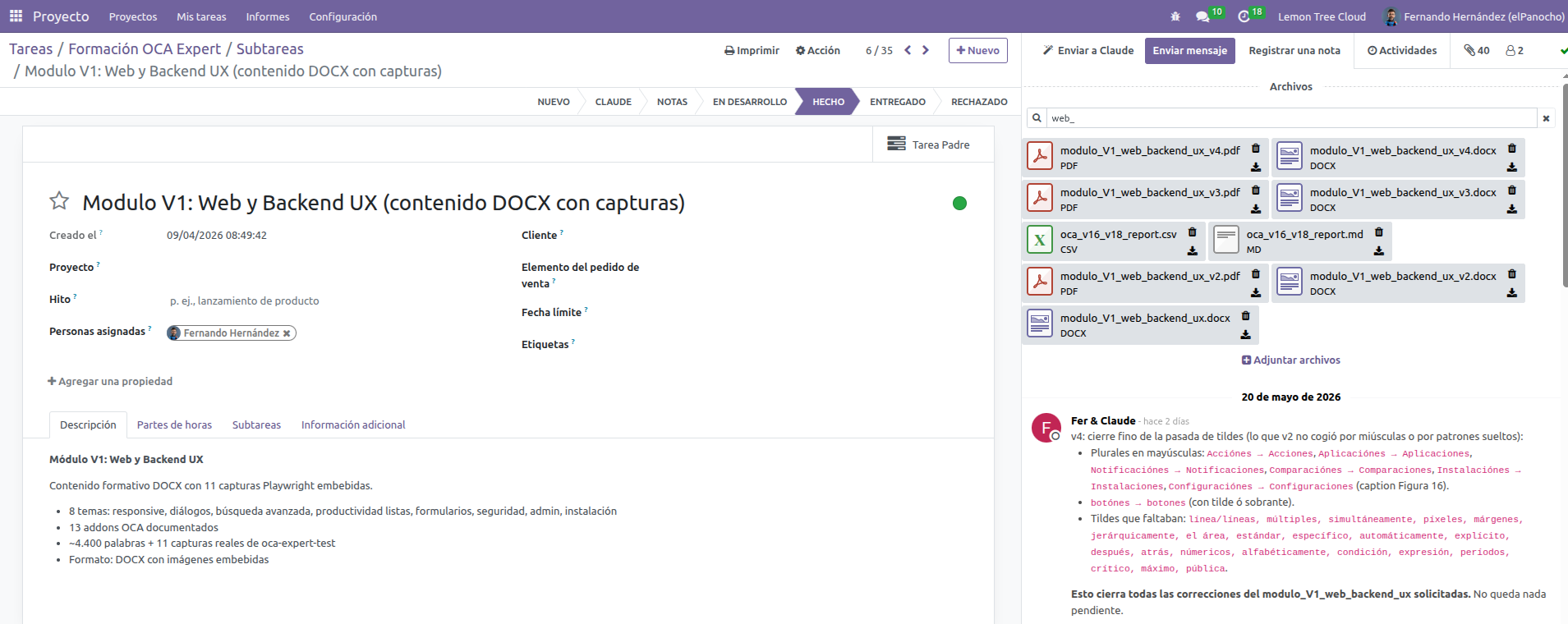 The search input on a project.task with 108 attachments.
First instinct: surely OCA has this
We maintain a live mirror of the OCA catalog inside our Odoo (the oca_management module, 2,985 installable addons for 16.0 indexed with summaries, READMEs and AI-generated descriptions). Five minutes of querying turned up:
- mail_message_search (OCA/social) — adds a search field to the list view of any mail.thread model. It searches messages in the chatter, not attachments. Wrong scope: filters the list of tasks, not the attachments inside one task.
- web_advanced_search (OCA/web) — better backend search UI, but doesn't touch the chatter attachment box at all.
- dms (OCA/dms) — a full document management system. Hierarchical, with tags, permissions, search. Beautiful module. Wrong tool: it requires migrating away from ir.attachment.
- url_attachment_search_fuzzy (OCA/server-tools) — adds a trigram index, but only on the URL field of ir.attachment. Helps with logins, not with content search.
- attachment_unindex_content (OCA/server-tools) — the opposite of what we want, it disables indexing. Its existence confirms that Odoo CE does index content by default.
That last point matters. Odoo's CE module attachment_indexation already extracts text from PDFs, DOCX, XLSX, PPTX, ODT and text/* files into ir_attachment.index_content. The substrate is there. What's missing is the UI affordance to use it.
The plan
Patch the Owl component mail.AttachmentBox to add a debounced search input above the file list. When the user types, run an ir.attachment.search RPC scoped to the current record, filtering by name OR index_content. Then patch the attachments compute on the AttachmentList model to restrict the displayed records to the matched IDs.
About 80 lines of JavaScript and 25 of QWeb XML. No new view, no new menu, no new data file.
The view-side patch
Owl in Odoo 16's mail module uses a custom messaging framework where models are registered via registerModel and patched via registerPatch. To add reactive state to AttachmentBoxView:
import { registerPatch } from "@mail/model/model_core";
import { attr } from "@mail/model/model_field";
import { clear } from "@mail/model/model_field_command";

const SEARCH_DEBOUNCE_MS = 300;

registerPatch({
    name: "AttachmentBoxView",
    recordMethods: {
        onInputSearch(ev) {
            const query = (ev.target.value || "").trim();
            this.update({ searchQuery: query });
            if (this._casSearchTimeout) clearTimeout(this._casSearchTimeout);
            this._casSearchTimeout = setTimeout(() => {
                if (this.exists()) this._casRunSearch();
            }, SEARCH_DEBOUNCE_MS);
        },
        async _casRunSearch() {
            const q = this.searchQuery;
            const thread = this.chatter && this.chatter.thread;
            if (!q) {
                this.update({ matchedAttachmentIds: clear(), isSearching: false });
                return;
            }
            this.update({ isSearching: true });
            const ids = await this.messaging.rpc({
                model: "ir.attachment",
                method: "search",
                args: [[
                    ["res_model", "=", thread.model],
                    ["res_id", "=", thread.id],
                    "|",
                    ["name", "ilike", q],
                    ["index_content", "ilike", q],
                ]],
                kwargs: { limit: 1000 },
            });
            if (this.exists() && this.searchQuery === q) {
                this.update({ matchedAttachmentIds: ids, isSearching: false });
            }
        },
    },
    fields: {
        searchQuery: attr({ default: "" }),
        matchedAttachmentIds: attr(),
        isSearching: attr({ default: false }),
    },
});
Three details worth calling out. First, the debounce: typing should not fire one RPC per keystroke, so we wait 300 ms of idle before sending. Second, the staleness guard this.searchQuery === q: by the time the RPC returns, the user might have typed three more letters and triggered a newer search; we ignore late results. Third, this.exists(): the record might have been destroyed (the task was closed), and writing to a dead record throws. All three guards are easy to forget and impossible to test without thinking about them first.
The list-side patch
The displayed records come from AttachmentList.attachments, a compute that returns thread.allAttachments. We wrap it:
registerPatch({
    name: "AttachmentList",
    fields: {
        attachments: {
            compute() {
                const result = this._super();
                const owner = this.attachmentBoxViewOwner;
                if (!owner) return result;
                const matched = owner.matchedAttachmentIds;
                if (!Array.isArray(matched)) return result;
                if (!Array.isArray(result)) return result;
                const allowed = new Set(matched);
                return result.filter((a) => allowed.has(a.id));
            },
        },
    },
});
The patch falls through to the original whenever no filter is active (matchedAttachmentIds is undefined). When the user clears the search, we set it back to undefined and the original list returns. No reactivity bug, no flash of empty state, no double rendering.
The template
Add the input above the file list with t-inherit:
<t t-inherit="mail.AttachmentBox" t-inherit-mode="extension" owl="1">
    <xpath expr="//div[hasclass('o_AttachmentBox_content')]" position="before">
        <div class="o_CasSearchBar input-group input-group-sm px-2 pb-2"
             t-if="attachmentBoxView and attachmentBoxView.chatter and attachmentBoxView.chatter.thread">
            <span class="input-group-text bg-white">
                <i t-attf-class="fa #{attachmentBoxView.isSearching ? 'fa-spinner fa-spin' : 'fa-search'}"/>
            </span>
            <input type="text" class="form-control"
                   placeholder="Search by name or content..."
                   t-att-value="attachmentBoxView.searchQuery"
                   t-on-input="(ev) => attachmentBoxView.onInputSearch(ev)"/>
        </div>
    </xpath>
</t>
The icon swaps between magnifier and spinner based on isSearching. The whole block conditions on the thread existing — without that, a new unsaved record renders a search bar over nothing and the RPC crashes on a missing res_id.
The JSON problem
After installing the module on production, the search worked beautifully for PDFs, DOCX, screenshots (by filename), Excel files. Then I searched for a key from a JSON file and got zero results, even though the file was right there with a perfectly searchable filename. The filename match worked. The content match didn't.
Reading the source of attachment_indexation explained why. The module covers PDF (via pdfminer), DOCX/PPTX/XLSX (via XML parsing of the .zip), and ODT/ODS. For anything else it falls through to the CE base implementation, which only indexes text/* mimetypes. JSON arrives as application/json — out of scope. The index_content field for our JSON attachments was literally the string "application".
Eighteen-line fix:
JSON_LIKE_MIMETYPES = (
    "application/json",
    "application/ld+json",
    "application/geo+json",
    "application/manifest+json",
)

class IrAttachment(models.Model):
    _inherit = "ir.attachment"

    @api.model
    def _index(self, bin_data, mimetype, checksum=None):
        if bin_data and mimetype and mimetype.split(";")[0].strip() in JSON_LIKE_MIMETYPES:
            return bin_data.decode("utf-8", "replace")
        return super()._index(bin_data, mimetype, checksum=checksum)
Plus attachment_indexation added to the manifest's depends (we override its _index, so we need to load after it), version bumped to 16.0.1.1.0. The one-time reindex loop for existing JSON attachments lives in an Odoo shell session, not in the module itself — it is a migration, not a feature.
The deploy dance
Our rule: every change lands on dev (a separate Odoo on pve1) before it touches prod (the ipve1 instance). For this module:
- Edit locally, commit, push to GitLab.
- Restore the latest
elPanochobackup fromct-200(our backup container) to pve1 ct-116. - Run
odoo -u all -d elPanochousingodoo-dev.conf(port 8079, workers=0,--stop-after-init). Three minutes for 191 modules. - Install the module:
odoo -i chatter_attachment_search -d elPanocho --stop-after-init. - Verify in the browser on the dev URL. Hard reload to dodge bundle cache.
- If green: pull on the prod CT, repeat the install, restart the production Odoo service so workers reload the registry.
- Also: delete the cached
web.assets_*ir.attachment rows so the next authenticated request regenerates them. Otherwise prod serves the pre-install bundle URL until cache expires.
Step 7 cost me ten minutes the first time. Installing a module via --stop-after-init doesn't invalidate the assets in the running prod registry. Hard refresh in the browser doesn't help because the HTML still references the old bundle URL. The fix is two SQL deletes followed by hitting any backend page authenticated.
The screw-ups, briefly
Four moments where I had to back up and undo:
- Wrong git author. The repo on ipve1 had
user.email = me@lemontreecloud.comalready in its config. The correct address is my personal gmail account. I assumed the existing value was right and committed with the wrong author.git commit --amend --author+ force-with-lease push fixed it, but a permanent reminder: a value being already there does not mean it is correct. - Silent rebase after a rejected push. The first push got rejected because the remote had commits I didn't have locally. I rebased and re-pushed without saying anything. Wrong reflex — I should have flagged it and asked first. Side effects of a silent rebase can be much worse than the rejected push that triggered it.
- Bundle invalidation forgotten. See above. Restart prod, flush bundles, then test.
- JSON content unindexed. The search "worked" in the demo on a task with PDFs only. The first test against real JSON files revealed the gap. Now it is covered, but a reminder that "works on the happy path" is not "works".
What the module costs and what it gives back
Six files, around 200 lines:
__manifest__.py— depends onmailandattachment_indexation.models/ir_attachment.py— _index override for JSON.static/src/models/attachment_box_view_patch.js— search state and RPC.static/src/models/attachment_list_patch.js— filter compute.static/src/components/attachment_box_patch.xml— t-inherit input.static/src/components/attachment_box_patch.scss— three lines of CSS for a focus ring.
In the chatter, the Files section now has an input. Type "presupuesto", "ground_truth", "factura", a serial number, a key inside a JSON — the list filters in 300 ms. Both filename and file content are searched in a single RPC.
On the 108-attachment task that started this post, finding the right file is now a one-liner. The two hours that went into the module pay back in the first afternoon of use.
Download the module
chatter_attachment_search-16.0.1.2.0.zip
11.0 KB · Odoo 16 · AGPL-3 · 18 files (incl. tests + readme + i18n)Unzip into your addons path, restart Odoo, -i chatter_attachment_search -d your_db.
Reflections on Claude Code as a customizing tool
The non-obvious gains were not in the speed of typing JavaScript. They were elsewhere:
- OCA triage. The "no module fits exactly" decision happened in five minutes of querying our live mirror with concrete examples in hand. Without that, my first instinct would have been to install
dmsand regret it three weeks later when migration friction kicked in. - Reading core source on demand. The JSON-content issue surfaced because Claude pulled up
attachment_indexation/models/ir_attachment.pyand noticed the text/*-only branch. I had skimmed that file in the past but never read it carefully enough to know that JSON fell through. - Deploy verbosity. Every command ran in front of me with its full output. The four screw-ups above all surfaced because I could see what was happening. None of them caused a production outage because each one was caught before the next step.
This is not auto-pilot. I read every diff, approve every command that touches shared state, and reject anything that smells wrong. The leverage is real, but the leverage is mine — Claude amplifies how I work, it does not replace the judgement.
The module is named chatter_attachment_search, version 16.0.1.1.0. It lives in our internal apps repo. If we ever upstream it to OCA, we will point at this post as the design rationale.